[FIXED] Some Settings are Managed by your Organization

Windows 10 users often complain that they get a message “some settings are managed by your organization” when they try to change their settings. This article will explain all those error messages along with different methods to Fix the issue. Different Types of Error Messages Some settings are managed by your organization message can appear … Read more

How to Uninstall Chromium Browser [4 Methods]

Are you seeing Chromium in your list of Installed programs? Well, Chromium is one such software that gets installed whenever you install certain software on your Windows. Find out different ways on How to Remove or Uninstall Chromium Browser from Windows 10, 8 and 7. There are many ways to remove chromium, you can follow … Read more

VPN vs Proxy: Which one is Best for You?

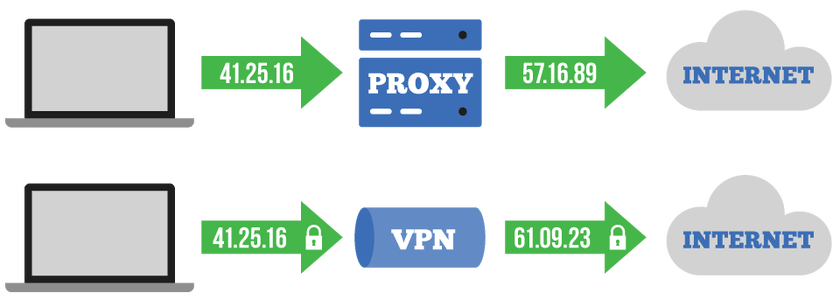
Ever wondered what is the difference between a Proxy and a VPN? What do you use to surf online? And do you know which one is the best for you? Find out everything in this VPN vs Proxy comparison article. Data breaches and hacks of major companies are now happening on a nearly daily basis. … Read more

How to do a System Restore on Windows 10, 8, 7

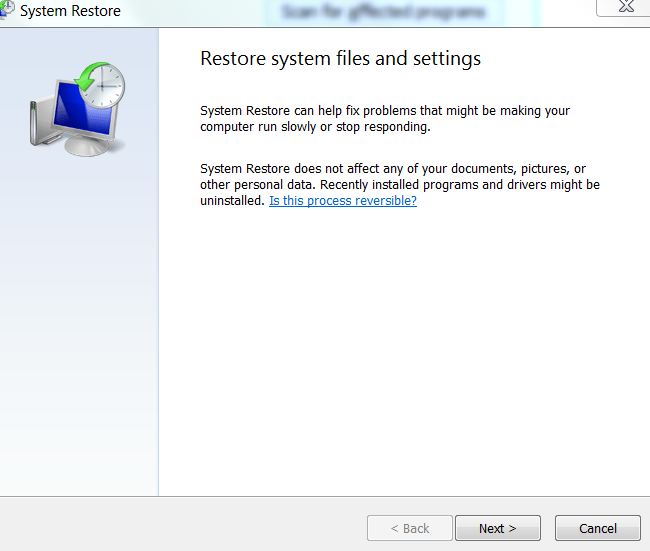
Sometimes something goes with our Windows 10 computer. Like you end up installing some third party software, and your computer starts acting weird. And in this case what you would do? Probably backing up your whole system and perform a reinstall. But the good thing about Windows 10 is that it comes with System Restore … Read more

How to Show File Extensions in Windows 10, 8 ,7

A single look at the file extension is enough for a regular windows user to determine the type of file he is dealing with. It saves time and makes organizing more efficient. You really don’t need to open a .docx file to determine that it’s a document. The extention itself says it all. In this … Read more